
- Qintar
- Free sheets
- Gold Stock Count and Manufacturing Loss
Gold Stock Count and Manufacturing Loss
Does your gold match your books, and is the gold lost in your workshops within the limit you set? This sheet has two parts. The stock count lists your pieces by karat and category, turns them into pure grams and compares the total with your book balance, flagging any difference above your tolerance. The loss log records every job sent to a workshop, the gold handed over and the pieces received back, and flags jobs above your alert limit.
Opens in Excel, or upload the file to Google Drive and open it with Google Sheets. You type in the yellow cells; everything else is worked out for you.
How to use it
- Count the stock: In "Stock count" enter each line: karat, category (bars, gold pounds, rings, bracelets, chains, scrap), number of pieces and weight.
- Set prices and limits: In "Count vs book" type today's buy price and the book balance for each karat (from your ledger) and the tolerance you choose.
- Read the differences: The sheet shows the difference in grams and in EGP for each karat, and marks any line above your tolerance with ⚠.
- Log workshop jobs: In "Workshop loss" enter each job: date, workshop, karat, gold handed over and pieces received. Type your alert limit for loss.
- Watch the averages: Each job shows its loss in grams and percent and the running average, and jobs above the limit turn red.
Example a count of three karats and four workshop jobs
The counts, book balances and jobs are examples from the file. The tolerance is 0.5 g and the loss alert limit 2%. Differences in EGP use the buy price (3 Nov 2026).
| Karat | Counted (g) | Book (g) | Difference (g) | Difference (EGP) | Status |
|---|---|---|---|---|---|
| 24K | 30 | 30 | 0 | 0.00 | Matches |
| 21K | 646.75 | 647.5 | -0.75 | −4,620.19 | Check |
| 18K | 155.7 | 155.7 | 0 | 0.00 | Matches |
Manufacturing loss in the example Example
| Workshop | Karat | Handed over (g) | Received (g) | Loss (g) | Loss % | Running average % | Status |
|---|---|---|---|---|---|---|---|
| Al-Hussein workshop | 21K | 500 | 489 | 11 | 2.20 | 2.20 | Above limit |
| Al-Hussein workshop | 21K | 300 | 295.2 | 4.8 | 1.60 | 1.98 | Within limit |
| Al-Nour workshop | 18K | 200 | 195.4 | 4.6 | 2.30 | 2.04 | Above limit |
| Al-Nour workshop | 21K | 400 | 393 | 7 | 1.75 | 1.96 | Within limit |
21K is 0.75 g short of the book, more than the 0.5 g tolerance, so it needs checking; 24K and 18K match. In the workshop log, 2 of the four jobs are above the 2% limit, and the overall loss rate is 1.96% (27.4 g of 1400 g).
Explained: The month-end gold count, step by step
A monthly count is how you know that the gold in your books is the gold in your shop. The sheet turns it into a short list of differences to explain rather than a pile of numbers.
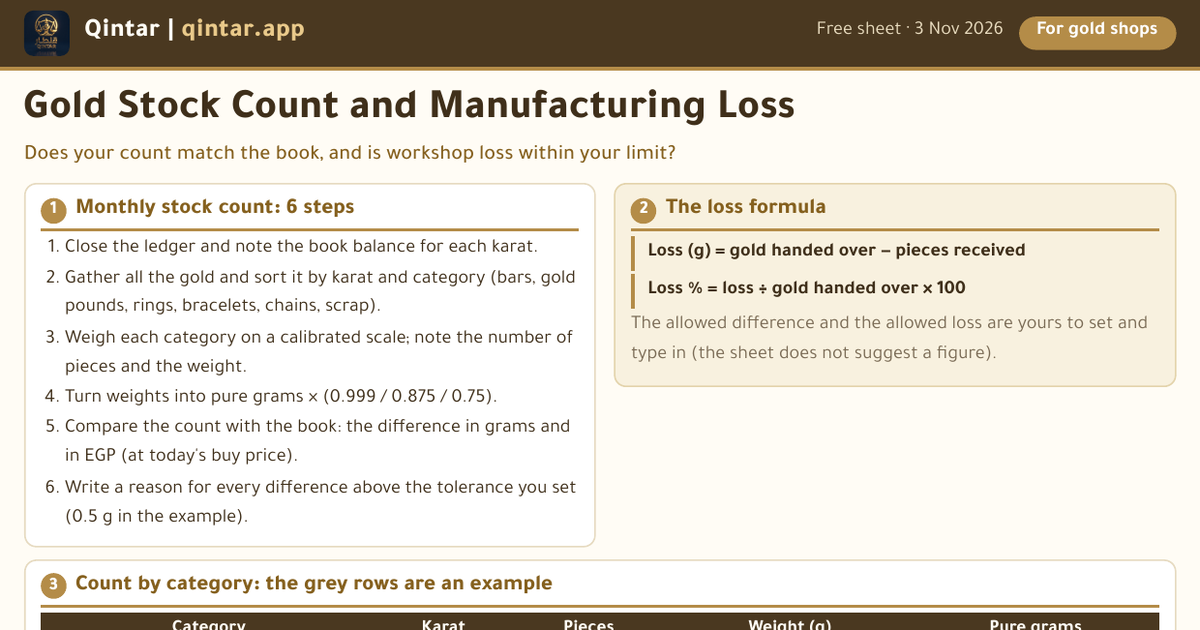
Start by closing the ledger and noting the book balance for each karat. Then gather all the gold and sort it by karat and by category: bars, gold pounds, rings, bracelets, chains and scrap. Weigh each category on a calibrated scale and write down the number of pieces and the total weight.
The sheet turns the weights into pure grams (24K × 0.999, 21K × 0.875, 18K × 0.75) and adds them up by karat and by category. It then compares the counted weight of each karat with the book balance. The difference in grams is valued at today's buy price, so you see what it means in money, and any difference above the tolerance you set is marked with ⚠. The tolerance is your own figure; the sheet does not suggest one.
Workshops are the other place gold goes missing quietly. When you send gold out to be made into pieces, some is lost in the work. Record each job: the gold handed over and the weight of the pieces received back. The loss is the difference, and the loss percent is the loss divided by the gold handed over. The running average shows whether a workshop is drifting, and jobs above your alert limit stand out in red.
A difference is not an accusation. It can come from a sale that was not written down, a mistake in weighing or a job that has not come back yet. The point of a monthly count is to find these while they are still fresh, and to write down the reason for each one.
- Manufacturing loss: how to measure and compare it
- Count differences: the usual causes
Questions people ask
What tolerance should I set?
The sheet does not suggest one: it is your decision, typed in a yellow cell. The example uses a figure only to show how the flag works.
How is manufacturing loss worked out?
Loss in grams = gold handed over − weight of the pieces received. Loss % = loss ÷ gold handed over × 100. The sheet also keeps a running average across jobs.
Why value the difference at the buy price?
Because the buy price is what the gold would fetch if sold to the market today, which gives a cautious money value for a difference in grams. The value is only a guide.
Related calculators and guides
Prices and calculations are for information only. They are not financial advice, an offer to buy or sell, or a religious ruling. Check tax matters with your accountant.
Live prices are in the app. The Qintar app shows gold and silver buy and sell prices in Egypt, your holdings at today's price and a zakat calculator. It is free, with no ads.
More free sheets
- Daily Gold Price Board for Your ShopA clean price board to hang in the shop and update every day.
- Pricing a Piece in Your Gold ShopWhat the price of a piece is made of, and what your margin really is.
- Gold Quick Reference: Karats, Units, Making ChargesEvery number and word you need before you walk into a gold shop in Egypt, on one page.